
You have probably seen the ads. “24-hour free trial.” “No credit card needed.” “Try before you buy.” Every IPTV provider seems to offer one, and honestly, that is a good thing. A free trial is the single best way to know if a service is actually worth your money before you commit to it.
But here is what most people get wrong. They sign up for a trial, watch a few channels, see that nothing crashes, and assume it is good enough. Then they buy a subscription and two weeks later they are dealing with buffering during the game they wanted to watch, or an app that keeps freezing on their Smart TV.
A free trial only protects you if you actually use it properly. That means testing the right things, in the right order, on the actual device you plan to use every day. This guide walks you through exactly what to check during your trial period, which red flags mean you should walk away, and how to compare providers once your test window closes.
At NovaStar IPTV, we talk to people every week who signed up for a trial, liked the surface-level experience, and got burned after paying. So let’s make sure that doesn’t happen to you.
Why Every Legitimate IPTV Service Should Offer a Free Trial
Think about it from a simple angle. If a company is confident their service works well, they want you to see that for yourself before asking for your money. A free trial is not a marketing gimmick when it is done right. It is a provider saying “test it, then decide.”
The absence of a free trial is not automatically a dealbreaker, but it does shift more risk onto you. Without a trial, you are trusting reviews, screenshots, and promises. With a trial, you are trusting your own eyes and your own remote control.
That is really the whole point. A trial removes the guesswork.
What Counts as a Legitimate IPTV Free Trial
Not all trials are created equal, and knowing the difference saves you from wasting time on one that does not actually tell you anything useful.
Trial Length Matters
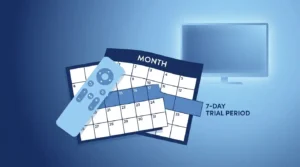
Most providers offer somewhere between 24 hours and 72 hours. Anything shorter than 24 hours barely gives you time to test more than a handful of channels. A 48 to 72 hour window is ideal because it lets you watch during different times of day, including peak evening hours when servers are under the most load.
If a provider only offers a couple of hours, treat that as a limitation, not a dealbreaker. Just plan your testing time carefully so you are not wasting it on setup and troubleshooting instead of actual evaluation.
No Credit Card Required Is the Gold Standard
This one matters more than people realize. A trial that requires your card details upfront puts you at risk of an automatic charge the moment the trial ends, sometimes without a clear reminder. If you genuinely forget, you have paid for something you never intended to keep.
A trial with zero payment information required is the safest option. You test the service with nothing on the line, and if you like it, you go ahead and subscribe on your own terms.
Full Access, Not a Limited Demo
Some so-called trials only unlock a handful of channels or block sports and premium content. That is not a real trial. It is a preview, and it will not tell you anything about whether the full package is worth paying for.
Before you sign up, ask the provider directly: does the trial include the full channel lineup, sports package, and VOD library, or is it a stripped-down version? A provider that hides part of the product during the trial is usually hiding a weakness somewhere.
The 7-Point Checklist to Test During Your Free Trial

This is where most people fall short. They open the app, flip through a few channels, and call it good. Here is what you should actually be checking.
1. Channel Loading Speed
Time how long it takes for a channel to load after you select it. Anything under 3 seconds is excellent. 3 to 6 seconds is acceptable. Anything longer than that consistently is a warning sign about server capacity.
2. HD and 4K Quality on Your Actual TV
Do not judge picture quality on your phone screen. Test it on the actual television you plan to watch on regularly. Screen size and TV processing can reveal compression artifacts and quality drops that a small phone screen hides completely.
3. EPG Accuracy
The Electronic Program Guide should show accurate, up-to-date schedules. Open the guide and compare a few listings against what you know is actually airing. A provider with outdated or broken EPG data is a sign of poor backend maintenance.
4. Live Sports During Peak Hours
If sports matter to you, this is non-negotiable. Test the service during an actual live game, ideally something popular that draws heavy traffic. This is when servers get stressed the most, and it is exactly when you need the stream to hold up.
5. VOD Library Depth and Playback
Browse the movie and series library. Check whether titles are recent, whether descriptions and thumbnails are accurate, and whether playback starts smoothly without long buffering at the beginning.
6. Multi-Device Switching
If you plan to use the service on more than one device, test switching between them during the trial. Log in on your phone, then your Firestick, then a laptop if applicable. Make sure the experience stays consistent.
7. Customer Support Response Time
Send a support message during your trial, even if you do not have an urgent question. Ask something simple like a device setup question. Time how long it takes them to respond. This single test tells you more about what to expect after you pay than almost anything else.
We generally recommend combining this with a proper test your internet speed check before you even start the trial, so you know your connection is not the reason for any hiccups you see.
Red Flags That Mean You Should Walk Away

Some issues during a trial are minor and forgivable. Others are signs of a provider you should avoid entirely, trial or not.
Trials that require full payment information upfront. If declining automatic renewal is buried in fine print or hard to find, that is a business model built around people forgetting to cancel.
No visible way to contact support. If you cannot find a WhatsApp number, email, or live chat option anywhere before you sign up, imagine trying to find help after something breaks.
“Lifetime” deals bundled into a trial offer. Genuine IPTV providers running stable infrastructure rarely offer lifetime access for a one-time fee. Servers, licensing, and bandwidth all cost money on an ongoing basis. A lifetime deal usually means the provider expects to shut down and relaunch under a new name within a year or two, leaving you with nothing.
Constant buffering even during off-peak hours. If the service struggles when server load should be light, it will fall apart completely during high-demand periods like weekend sports.
Pressure tactics during the trial. Countdown timers, repeated messages pushing you to buy before the trial ends, or discounts that expire in a few hours are sales tactics, not signs of product confidence.
Not every provider handles trials the right way, and figuring that out on your own takes time most people do not have. NovaStar IPTV connects you with verified providers who have already been vetted for stable servers, honest trial terms, and responsive support, so you are not the one doing the detective work.
How to Get Set Up Before Your First Trial
A little preparation makes your trial period far more useful.
Check Your Internet Speed First
You need a stable connection before you can fairly judge any IPTV service. A minimum of 25 Mbps is recommended for smooth HD streaming, and closer to 50 Mbps if multiple people in your home will be streaming at once. If your connection is borderline, run a proper speed test before blaming the provider for issues that are actually on your end.
Choose the Right Device for Testing
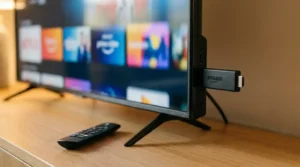
Test on the device you will actually use most, not whatever is easiest to grab. If you plan to watch mainly on a Firestick, test on the Firestick, not your phone. Different devices handle IPTV apps differently, and a smooth experience on one does not guarantee the same on another. You can check your device compatibility with our free tool before you even start.
Install a Recommended Player App
Most providers work with apps like IPTV Smarters Pro, TiviMate, or similar players. Get the app installed and ready before your trial window starts, so you are not burning trial time on setup and troubleshooting.
Comparing Providers After Your Trial Ends
Once your trial is done, compare your notes across a few key categories: reliability during peak hours, actual channel and VOD quality, how fast support responded, and whether the pricing matches the value you experienced.
Do not just go with whichever trial felt “fine.” Fine is not the bar. You are looking for a provider that performed consistently well across all seven test points, not just one that avoided obvious disasters.
Frequently Asked Questions
How long should an IPTV free trial last?
Most legitimate providers offer between 24 and 72 hours. A 48 to 72 hour window is ideal because it gives you time to test the service during peak evening hours and across multiple viewing sessions, not just a single quick look.
Do I need to give my credit card for an IPTV free trial?
No, and you generally should not have to. The safest trials require zero payment information upfront. If a provider insists on card details before the trial starts, make sure their cancellation and refund policy is completely clear before proceeding.
What internet speed do I need for an IPTV free trial?
A minimum of 25 Mbps is recommended for smooth HD streaming. If you plan to test 4K content or stream on multiple devices simultaneously, closer to 50 Mbps gives you a more accurate picture of real performance.
Can I test an IPTV free trial on more than one device?
Yes, and you should if you plan to use multiple devices regularly. Testing on just one device only tells you how the service performs in that specific environment. Switch between your phone, Firestick, or Smart TV during the trial for a complete picture.
What if the IPTV free trial buffers a lot?
Some buffering during your trial can point to your internet connection, your device, or the provider’s servers. Rule out your own setup first by testing your speed and trying a wired connection if possible. If buffering continues even on a stable connection, especially during off-peak hours, that is a sign the provider’s infrastructure cannot handle demand.
Are IPTV free trials legal?
IPTV as a technology is legal. The trial itself is simply a temporary access period offered by a provider, the same as any other free trial offer. What matters is choosing a provider that operates transparently, with clear terms and legitimate licensing arrangements.
How do I find a provider with a genuine free trial?
Look for providers that are upfront about trial length, do not ask for payment details, and give you full access to the actual product, not a limited demo. If comparing providers on your own feels overwhelming, NovaStar IPTV can match you with a verified provider based on your device, budget, and what you actually watch.